Creating a Product Carbon Footprint (PCF)
After reading this guide, you will be able to:
- Understand what a PCF is, when it is required, and which standards apply
- Choose between PCF Studio and the Climatiq API based on your use case
- Follow a step-by-step process to produce a PCF with your chosen tool
What is a Product Carbon Footprint?
A Product Carbon Footprint (PCF) quantifies the total greenhouse gas emissions generated throughout a product’s lifecycle. Depending on the depth of the analysis, these footprints are typically categorized into two main scopes:
- Cradle-to-Gate: This approach focuses on the “upstream” stages, accounting for everything from raw material extraction and supplier transportation to the final manufacturing process at the factory gate.
- Cradle-to-Grave: This provides a comprehensive “full-lifecycle” view. It encompasses the entire cradle-to-gate journey while adding “downstream” impacts, such as emissions from the product’s use phase and its eventual end-of-life disposal or recycling.
Regardless of the scope, the final impact is standardized as a ratio: kg CO2e per functional unit (for example, per kilogram of material or per individual unit produced). This allows for consistent benchmarking across different industries and product categories.
PCFs are increasingly required by customers and regulators, pushing manufacturers to quantify and disclose the carbon embedded in their products. Key industries driving PCF adoption include manufacturers of industrial materials, consumer goods, components and subassemblies, construction materials, food and agricultural products, and more.
PCFs are likely relevant for you if any of these apply:
- You sell to companies with over €450m in revenue, or companies that sell to them
- Your customers have SBTi targets or other net zero commitments
- Your products will be impacted by DPP legislation
- You make sustainability part of your value proposition
PCF calculations are governed by ISO 14067:2018 and the GHG Protocol Product Standard, and they are based on the Life Cycle Assessment (LCA) framework. An LCA breaks a product’s impact into lifecycle stages (raw materials, manufacturing, transportation, use-phase, and end-of-life) and applies emission factors specific to each stage.
How Climatiq supports PCF modeling
Climatiq provides two routes to PCF calculation. Both use the same underlying calculation engine: PCF Studio’s interface calls the same Climatiq PCF API that you can use directly. The difference is in who uses them and how.
PCF Studio is for sustainability managers and non-technical users who need to produce credible PCFs quickly, without writing code or going deep into LCA methodology. You interact through a guided web interface: upload or generate a BOM, review AI-matched emission factors, and receive a shareable result with a full audit trail in minutes.
The PCF API is for developers building PCF calculation into software products or automated workflows. You construct requests programmatically, which gives full control over lifecycle boundaries, complex supply chain modeling, and integration into your own systems, at any scale.
| PCF Studio | PCF API | |
|---|---|---|
| Who it’s for | Sustainability managers responding to customer requests, RFPs, or regulatory requirements | Developers building PCF features into applications or automated pipelines |
| How you interact | Web interface | Programmatic API calls at scale |
| BOM input | Upload CSV/Excel, AI-generated, or manual entry | Structured JSON per request |
| AI-generated BOM | ✓ | ✗ |
| Multi-supplier materials (variations) | Coming soon | ✓ |
| Hierarchical BOM (product references) | Coming soon | ✓ |
| Lifecycle coverage | Cradle-to-gate | Cradle-to-gate and end-of-life |
| AI-powered electricity estimation | ✓ | ✗ |
| End-of-life waste calculations | Coming soon | ✓ |
| Output | CSV export with full audit trail | Full audit trail in API response |
| Scale | One product at a time, results in minutes | Thousands of products, fully automated |
PCF Studio
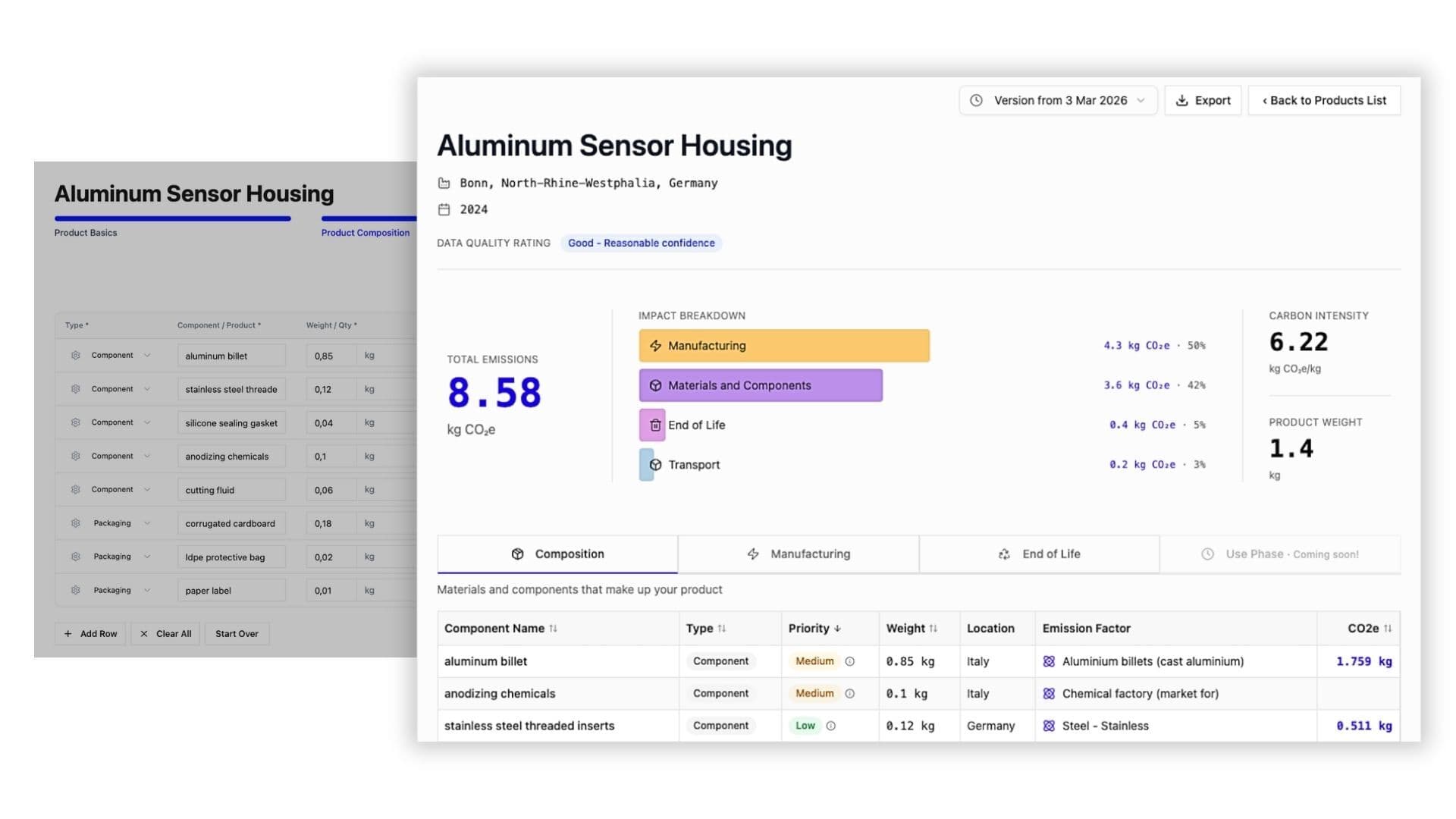
PCF Studio provides manufacturers with an easy and fast way to calculate PCFs for their products. Upload a bill of materials (BOM) and PCF Studio uses AI-powered emission factor mapping to match each component to the most appropriate LCA-based factor - drawing on sources including Agribalyse, Circular Ecology, OEKOBAUDAT, and Plastics Europe, as well as premium databases like ecoinvent and Carbon Minds. PCF Studio also handles data gap-filling for incomplete BOMs, BOM generation, and built-in calculations for energy, freight, waste, and end of life.
Results are aligned with ISO 14067 and PACT, with full audit trails and data quality indicators included.
PCF API
For developers building PCF functionality into their own applications, the Climatiq PCF API lets you send your product’s components, manufacturing location, and energy inputs as a JSON request and receive a complete CO2e result in return. Climatiq handles emission factor selection, lifecycle stage calculations, and transport emissions automatically. The response includes a full breakdown by component and lifecycle stage, with source attribution and data quality indicators.
Full reference for the Climatiq PCF endpoint. Input your bill of material components and receive CO2e across lifecycle stages with source attribution and data quality indicators.
Step-by-step guide to calculating your first Product Carbon Footprint with the Climatiq API - from a simple bill of materials to a full cradle-to-gate result.
How to manage PCF versions, update existing products, list all your PCFs, and ensure consistency across revisions.
How to model complex supply chains by referencing other PCFs as components, and how to handle variations from multiple suppliers.
Supporting resources
Deep dive into LCA methodology and how to apply lifecycle-stage emission factors in the Climatiq API.
How to identify and use LCA-specific activity IDs when building product-level emission calculations.
How Climatiq calculates CO2e from constituent greenhouse gases using GWP100 values.
Understanding Climatiq’s data quality indicators and how to handle gaps in your PCF calculation.
How to upload and use supplier-specific or custom emission factors alongside Climatiq’s public database - relevant when primary data is available for specific materials or processes.
Walk through a complete worked example of building a cradle-to-gate PCF with the Climatiq API, from bill of materials to a full CO2e result.