Data Studio
After reading this guide, you will be able to:
- Understand what Data Studio is and which features are available on your plan
- Find the right emission factor for any activity using the Data Explorer
- Upload activity data and calculate emissions using Bulk Calculators
- Manage private emission factors and understand how automatic data updates work
What is Data Studio
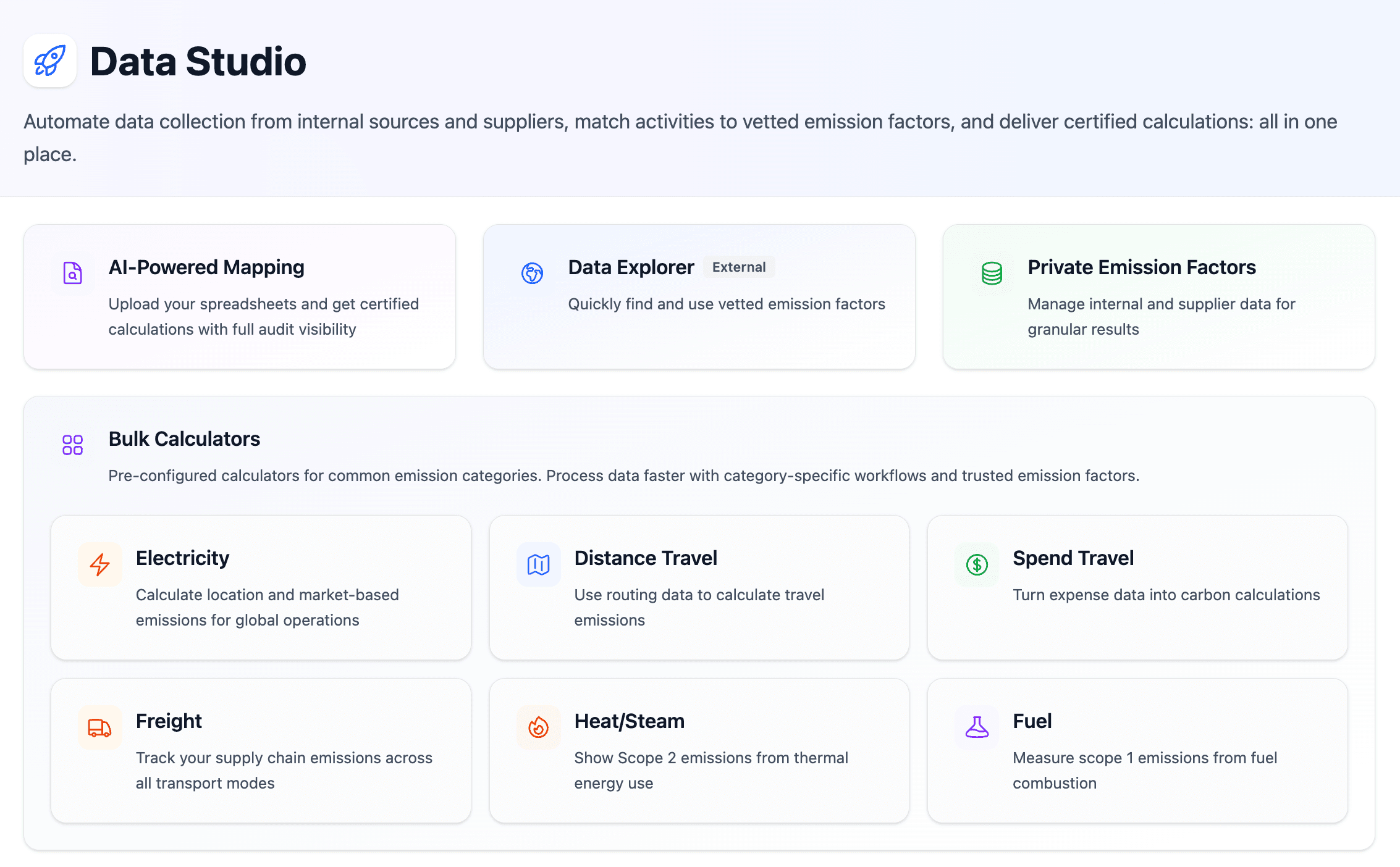
Data Studio is a central workspace for sustainability teams to collect, validate, and manage emission factor data and calculate emissions. It lets you quickly find the right emission factor for any activity, understand its source and calculation method, and export a defensible, audit-ready set of emission factors into your reporting workflow. You can also upload your own private emission factors and calculate emissions for common emission categories including Energy, Heat, Freight, Distance Travel, Electricity, Spend Travel, and Fuel.
Who should use Data Studio
| Role | What for |
|---|---|
| Sustainability managers | Building or reviewing emission factors for annual reporting cycles |
| Sustainability consultants | Quickly sourcing factors for customers across multiple industries and geographies |
| Carbon accounting teams | Maintaining a defensible, auditable factor set that can be shown to auditors and standards bodies |
| Data and product teams | Evaluating emission factor quality before integrating via the API |
Getting started
Log in to your Climatiq account
Go to app.climatiq.io and sign in. If you do not have an account, create one at climatiq.io . From there, you will automatically be directed to the Data Studio dashboard.
Choose a feature
From the Data Studio home, you can navigate to the Data Explorer, Bulk Calculators, or manage your Private Emission Factors.
Features
Data Explorer
Data Explorer is Climatiq’s repository of vetted emission factors, with wide regional and industrial coverage. You can browse and filter by scope categories, data sources, and LCA stages to find the right factor for any activity.
Learn how to search, filter, and interpret emission factors in the Data Explorer.
Browse Climatiq’s full database of 1M+ scientifically-vetted emission factors — no account required.
Private Emission Factors
Private Emission Factors allow organizations to upload and manage their own emission factors alongside Climatiq’s database. These factors are visible only to users within your organization’s account.
When to use private emission factors:
- Supplier-specific factors provided directly by a vendor
- Industry-specific or process-specific factors derived from internal measurement
- Country-specific factors not yet covered in the Climatiq database
Private emission factors are stored within Data Studio in the same way as other emission factors in the Climatiq database, but they do not go through Climatiq’s vetting process. The accuracy and documentation of private factors remain the responsibility of the uploading organization.
Automatic Data Updates
Available on: All plans
Climatiq monitors source datasets for updates and ingests new versions when they are published by the originating bodies (for example, annual BEIS updates or IEA electricity factors). When an update occurs, a new data version is published and the details are added to the Data Versions Changelog.
This means you do not need to manually monitor each data source’s website for dataset refreshes. The Data Studio UI clearly indicates when a factor has been replaced and links to the new version.
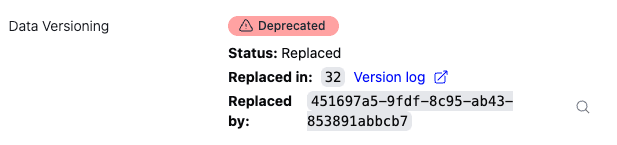
Automatic updates track and publish new versions — they do not automatically update your existing reports or calculations.
How to check which data version you are using:
- API: See the data versioning guide for how to pin or update your data version. If you have been caching the database, you will need to re-cache it.
- Excel / Google Sheets (auto calculation enabled): Always uses the latest data version available in Climatiq’s database.
- Excel / Google Sheets (manual calculation): Re-run the Climatiq formula by clicking the cell and pressing Enter.
Bulk Calculators
If you have large volumes of activity data in CSV format, Bulk Calculators let you import your data and quickly calculate emissions across business travel, energy, freight, and other scope categories.
Mapping Agent
Available on: Data Pro, Enterprise
The Mapping Agent uses Climatiq’s AI-based search engine to automatically match your activity descriptions or spend categories to the most appropriate emission factor in the database. This is particularly useful for Scope 3 Category 1 (Purchased Goods and Services) reporting, where large volumes of activities need to be classified quickly. Every match includes an auditable record of why a specific factor was selected.
Emission Factor Collections
Available on: Data Pro, Enterprise — coming soon
Emission Factor Collections will allow users to group and save curated sets of emission factors into named collections. This will enable teams to maintain a governed, versioned factor library rather than re-selecting the same factors manually each reporting cycle.
Anticipated use cases include locking a factor set at the start of a reporting period, sharing a standardized library across multiple analysts or project teams, and comparing factor sets between reporting years to identify methodology changes.
Data methodology, coverage and licensing
How Climatiq collects emission factors from various sources, standardizes them, and makes them available.
How Climatiq manages data versions and how to control which version your calculations use.
Supporting resources
Step-by-step guide to using Data Studio’s Bulk Calculators to import activity data and generate CO2e estimates by category.
Learn how to search, filter, and interpret emission factors in the Data Explorer.
Email and ticket-based support for product questions. Available on Data Pro and Enterprise plans.
Licensing questions, custom quotes, enterprise plans, and inquiries from new customers.