API Overview
Climatiq’s REST API exposes a set of use-case-specific endpoints - each designed for a particular activity category and set of inputs. This page helps you identify which endpoint fits your use case and what data you need to call it.
Why use the API?
The Climatiq API is built for teams that need emissions calculations at scale or embedded within their own systems. Common use cases include:
- Integrating into a software platform - embed emissions calculations directly into your product, so your users get CO2e results without leaving your application
- Connecting to a data lake or ERP - automate emissions data flows from your existing financial, operational, or supply chain systems
- Processing large datasets - run high-volume, batch calculations programmatically rather than manually uploading files
- Building automated reporting pipelines - generate auditable emissions reports on a schedule without manual intervention
- Creating customer-facing carbon tools - surface emissions data to your end customers as part of a sustainability feature
Which endpoint should I use?
General-purpose endpoints
| Use case | Key inputs | GHG Scopes | Endpoint | Resources |
|---|---|---|---|---|
| Estimate CO2e for any activity | Activity ID, quantity, unit | All scopes | Estimate | Batch calculations using Activity IDs |
| Search emission factors | Keywords, region, sector | All scopes | Search | Browse Data Explorer |
| Match free-text to an emission factor | Plain-language description (invoice line, activity name) | All scopes | Mapping Agent | Mapping Agent Integration Guide |
| Use custom emission factors | Your own factor data | All scopes | Private Factors | Uploading Private Factors |
Activity-specific endpoints
| Use case | Key inputs | GHG Scopes | Endpoint | Resources |
|---|---|---|---|---|
| Travel | Origin, destination, travel class, trip type | Scope 3.6 | Travel | Scope 3.6 travel guide |
| Energy | Energy quantity, energy type, region | Scope 1, Scope 2, Scope 3.3 | Energy | FERA & upstream Scope 3 guide |
| Freight | Route, cargo weight, transport modes | Scope 3.4, Scope 3.9 | Intermodal Freight | Freight quickstart |
| Spend data | Spend activity description, spend amount, currency | Scope 3.1 | Mapping Agent | Mapping Agent Integration Guide |
| Product carbon footprint | Component names, weights, locations | ISO 14067 (product-level) | PCF | Create your first PCF |
About the endpoints
General-purpose - Unlike activity-specific endpoints (which accept structured inputs like a flight route or an energy reading), general-purpose endpoints are not tied to a specific activity type. They work with any activity across Climatiq’s factor database. Use Estimate when you already have an activity_id and want to calculate CO2e directly. Use Search to browse and identify the right factor. Use the Mapping Agent when your input is free-text or unstructured and you want factor matching handled automatically.
Use-case-specific - The Travel, Energy, Freight, Procurement, and PCF endpoints accept richer, activity-native inputs (origin/destination, kWh, weight, spend) and handle factor selection and methodology alignment for you. Use these when your data already fits the activity type.
Extensible - Private Emission Factors let you upload custom factors that work alongside Climatiq’s public database in any estimate, search, or Mapping Agent call (on request). Useful when you have supplier-specific data or need to model activities not covered by the public dataset.
GHG Scope-aligned - Use-case-specific endpoints map directly to GHG Protocol scope categories, so you don’t need to determine scope alignment yourself. Travel covers Scope 3.6, Energy covers Scope 1, 2 and 3.3, Procurement covers Scope 3.1, and Freight covers Scope 3.4 and 3.9 per ISO 14083. The endpoint handles the methodology compliance for you.
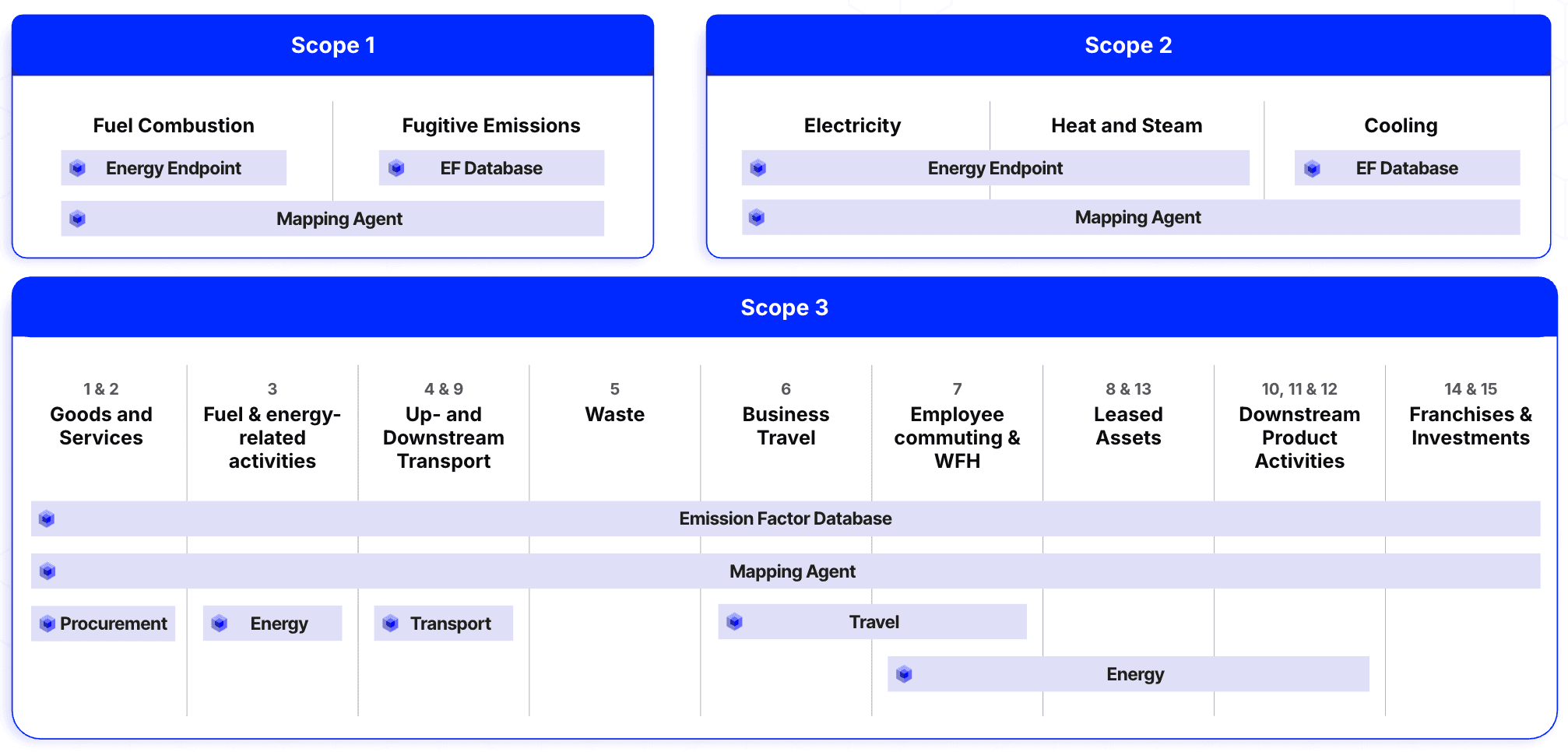 Which Climatiq API endpoint to use based on the GHG scope you need to calculate.
API stability
Endpoints are either GA (Generally Available) or Preview. GA endpoints maintain backward compatibility with a minimum one-year deprecation window. Preview endpoints give early access to new features but are subject to more frequent updates while still in preview. Any breaking changes are introduced as a new preview version, so you have time to migrate before they reach GA. See the API Versioning guide for full details.
Ways to test
Before building a full integration, you can explore and test Climatiq’s endpoints without writing code from scratch. The Postman collection lets you run requests interactively against the live API. If you prefer working in Python, the integration guide walks you through making your first calls using the Climatiq Python client.
Explore all Climatiq API endpoints using the pre-built Postman collection - no code required to test your first request.
Step-by-step guide to making your first Climatiq API calls using the Python client.
Related articles
Make your first CO2e estimate with the Climatiq API in minutes.
Every endpoint, parameter, and response field with interactive examples.
Step-by-step guide to building a production-ready integration with the Climatiq API.
GA vs Preview, deprecation policy, and how to manage migrations.
Concurrency limits, batch endpoints, and Mapping Agent at scale for high-volume integrations.
Build an integration that maps activity data to emission factors automatically using the Mapping Agent API.