Integrate Climatiq into my own software
After reading this guide, you will be able to:
- Understand Climatiq’s API architecture, versioning model, and available endpoint categories
- Authenticate and make your first CO2e estimate using the REST API
- Choose the right endpoint for your use case - single estimates, batch processing, travel, energy, freight, or procurement
- Integrate the Mapping Agent to automate emission factor mapping for unstructured user data
- Build production-ready integrations with versioning, error handling, and private factors
Building carbon intelligence into your product
Climatiq’s REST API is designed to help developers build tools that automate the calculation of carbon emissions across any business activity. Built on top of Climatiq’s scientific emission factor database, it exposes use-case-specific endpoints for travel, energy, freight, procurement, and product carbon footprints - so you can integrate accurate CO2e calculations into your application without building the underlying data infrastructure yourself.
How it works
The Climatiq API acts as a real-time carbon calculation engine sitting behind your software. Your application sends activity data - a flight route, an energy reading, an invoice line - to the relevant Climatiq endpoint. Climatiq matches that input to the right emission factor from its scientific database, runs the calculation, and returns a CO2e value with a full source trail. Your software receives the result and can use it however your product needs: powering a dashboard, generating a customer report, feeding a data pipeline, or enabling scenario planning.
This means you do not need to build or maintain the underlying emissions data infrastructure. Climatiq handles the methodology, factor selection, data updates, and audit trail - your team focuses on the product layer.
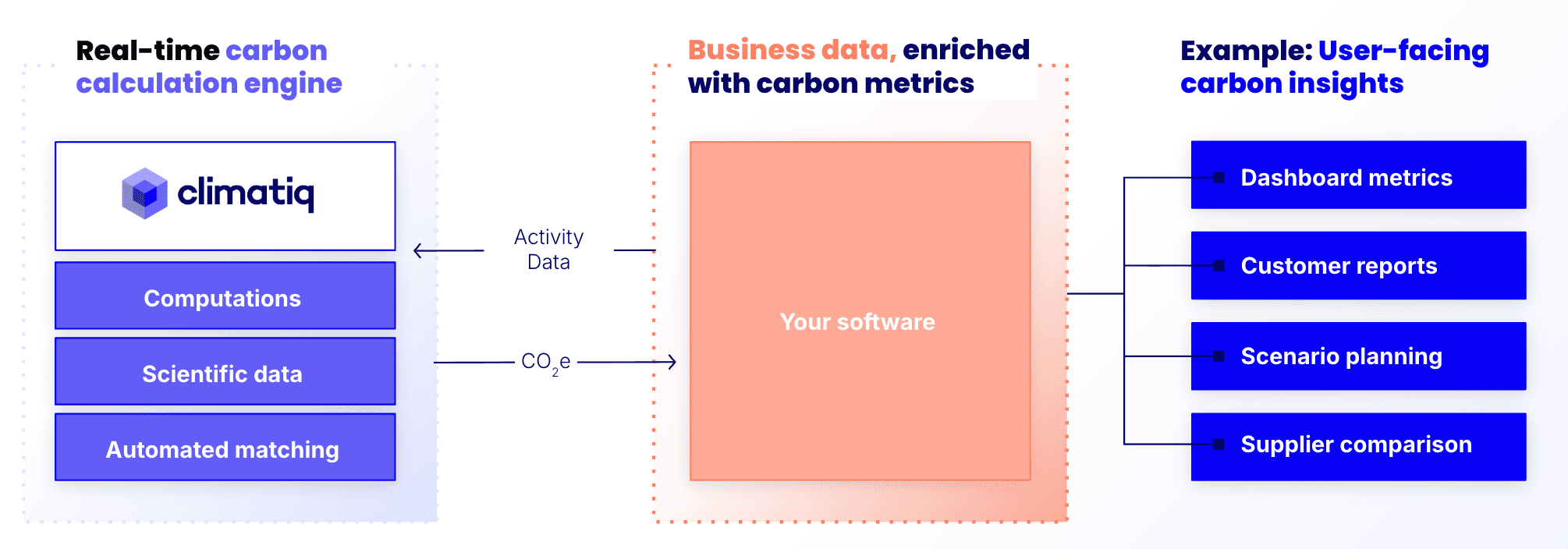 The Climatiq API as a back-end carbon calculation engine: your software sends activity data, Climatiq returns CO2e, and your product surfaces insights to users.
Climatiq’s REST API is:
- Versioned - GA endpoints maintain backward compatibility, with a one-year deprecation window before any breaking changes
- Documented - every endpoint has comprehensive reference documentation with request/response examples
- Extensible - support for accessing your own emission factors via the private emission factors functionality lets you enrich the public database with client- or supplier-specific data
- Audit-ready - every calculation returns a source trail outlining the emission factors behind the calculations
What you can build
Accessing emission factors
Climatiq maintains a continuously updated database of emission factors across hundreds of geographies, sectors, and data sources. When you integrate with the API, you get access to this database without having to source, vet, or maintain the underlying data yourself - Climatiq publishes monthly updates as new datasets are released or existing ones are revised.
You can query the database programmatically via the Search API to find factors by activity, region, year, and source, or browse visually in the Data Explorer. If your integration needs a local copy - for example to reduce API calls, support offline use, or back a factor-selection UI - you can paginate through the Search API to pull factors into your own environment. Use a dynamic data version when syncing so your cache stays compatible with Climatiq’s monthly data releases. See the data versioning guide for a full explanation of fixed vs. dynamic versions.
REST endpoint for querying emission factors by activity, region, year, and source dataset. Returns matching factors with full metadata including unit, source, and data quality indicators.
Browse and search Climatiq’s full emission factor database visually - no code required.
Single-activity estimates
The basic Estimate endpoint accepts an activity_id, quantity, and unit and returns a CO2e value. This is the starting point for most integrations - use it to calculate emissions from any activity in Climatiq’s 1M+ factor database. You can find the right activity_id for your use case using the Activity ID guide, the Data Explorer , or the Search API.
General-purpose REST endpoint for single activity-based CO2e estimates. Submit an activity ID, quantity, and unit. Returns CO2e with source and audit trail.
Process multiple estimates in a single API call - essential for high-volume applications calculating emissions across large datasets or for multiple users simultaneously.
Specialized calculation endpoints
For specific activity categories, Climatiq provides purpose-built endpoints with richer input parameters and methodology-specific outputs:
Emissions from flights, rail, car journeys, and hotel stays. Accepts origin, destination, travel class, and trip type. Aligned with GHG Protocol Scope 3.6.
Electricity and fuel-energy emissions. Supports location-based and market-based Scope 2 methods, plus upstream FERA (well-to-tank and T&D) for Scope 3.3.
Multi-modal freight emissions across air, road, rail, and sea. ISO 14083-compliant. Automatically identifies transit hubs and handles pre/post-leg segments.
Spend-based Scope 3.1 estimates. Submit a spend amount, currency, and sector - Climatiq applies the appropriate EEIO factor for the region and returns CO2e.
Browse the full Climatiq API reference - every endpoint, request parameter, and response field, with interactive examples.
Mapping Agent - automated emission factor mapping
The Mapping Agent (formerly Autopilot) uses AI to map unstructured input data to the correct emission factor. Instead of requiring structured data to use with a dedicated endpoint, or users needing to select an activity_id, your application can pass a free-text description (invoice line, product name, activity description) and the Mapping Agent returns a matched factor, confidence label, and CO2e estimate.
How to integrate the Mapping Agent’s suggest and estimate workflow into your application - covering authentication, request format, confidence scores, and handling low-match responses.
REST endpoint for automated emission factor matching. Accepts unstructured text and returns matched activity IDs, emission factors, and CO2e estimates with match confidence metadata.
Product Carbon Footprints (PCF)
The PCF endpoint calculates cradle-to-gate product carbon footprints from bill-of-materials data. It uses LCA-based emission factors and returns CO2e across lifecycle stages, aligned with ISO 14067.
REST endpoint for calculating product carbon footprints from bill-of-materials inputs. Returns CO2e across lifecycle stages with full source trail.
Step-by-step guides for modeling a Product Carbon Footprint with the Climatiq API - from your first PCF to managing versions and product references.
Private emission factors
If your application serves clients or sectors where supplier-specific or custom emission factors are needed, Climatiq supports private emission factors - custom data you upload and use alongside the public database in estimate and search calls.
How to create, upload, and use private (custom) emission factors via the Climatiq dashboard or API. Covers authentication, factor format, and how private factors interact with public ones.
REST endpoint for managing private emission factors - create, list, update, and delete custom factors that become available in your estimate and search calls.
Demos
See Climatiq’s API capabilities in action before you build.
Browse and search Climatiq’s emission factor database interactively. Find the right factor for any activity before building your integration.
Interactive demo of the Intermodal Freight API - calculate multi-modal freight emissions across air, road, rail, and sea.
See how the Mapping Agent automatically matches free-text descriptions to the right emission factor - submit any activity description and receive a matched factor with confidence score.
Your journey
Generate your API key
Create a Climatiq account and generate your API key from the Dashboard. Store it securely - never expose it in client-side code or public repositories.
Note: A new account is automatically enrolled in the free plan, which allows you to test the Search and Estimate APIs with up to 250 API calls per month. Note that Search results on the free plan do not include raw emission factor values.
Explore the API reference
Review the available endpoints in the API Reference to understand what calculations Climatiq supports. Identify which endpoints apply to your use case, paying attention to whether an endpoint is GA (stable) or Preview (subject to faster change).
Make your first API call
Follow the Quickstart guide to make your first CO2e estimate. Understand the request structure (activity_id, parameters, data_version) and the response format, including the source trail fields. If you prefer to explore via Postman, use our Postman collection.
Integrate the right endpoints for your product
Map your application’s use cases to the appropriate Climatiq endpoints. Use the Mapping Agent to handle unstructured user input, purpose-built endpoints (travel, energy, freight, procurement) for structured data, and the basic Estimate endpoint for everything else.
Prepare for production
Pin your API and data versions to ensure stable, reproducible results. Implement error handling for rate limits and validation errors. Review Climatiq’s versioning and deprecation policy to understand how to manage future updates without disrupting your users.
Supporting resources
Step-by-step instructions for creating and managing your Climatiq API key from the Dashboard.
Make your first CO2e estimate with the Climatiq API in minutes - includes a complete request and response example.
Explore Climatiq’s API endpoints using the pre-built Postman collection - no code required to test your first request.
How Climatiq versions its API endpoints, the difference between GA and Preview, and how to manage migrations without disrupting your integration.
How to integrate the Mapping Agent suggest-and-estimate workflow into your application, including handling low-confidence matches and user review flows.
Step-by-step guide to your first freight emission estimate using the Intermodal Freight API.
The difference between unit and unit_type API fields - and how Climatiq handles conversions between compatible units.
How Activity IDs are structured and how they uniquely identify a factor across datasets, regions, and sectors.