Integrating into a data lake or pipeline
Many organizations already have their operational data (procurement transactions, energy consumption records, logistics data, travel bookings) centralized in a data lake or warehouse. Rather than exporting that data to spreadsheets or running manual carbon calculations, you can enrich it automatically using the Climatiq API as part of your data pipeline.
The result is auditable, continuously updated emissions data stored alongside the operational records that generated it, accessible to every team that needs it.
The general pattern
Integrating Climatiq into a data pipeline follows the standard ETL pattern:
- Extract: query activity records from your data store (spend transactions, energy readings, shipment records, etc.)
- Transform: send activity data to the relevant Climatiq endpoint and receive emissions results
- Load: write the results back to your data store, linked to the original record
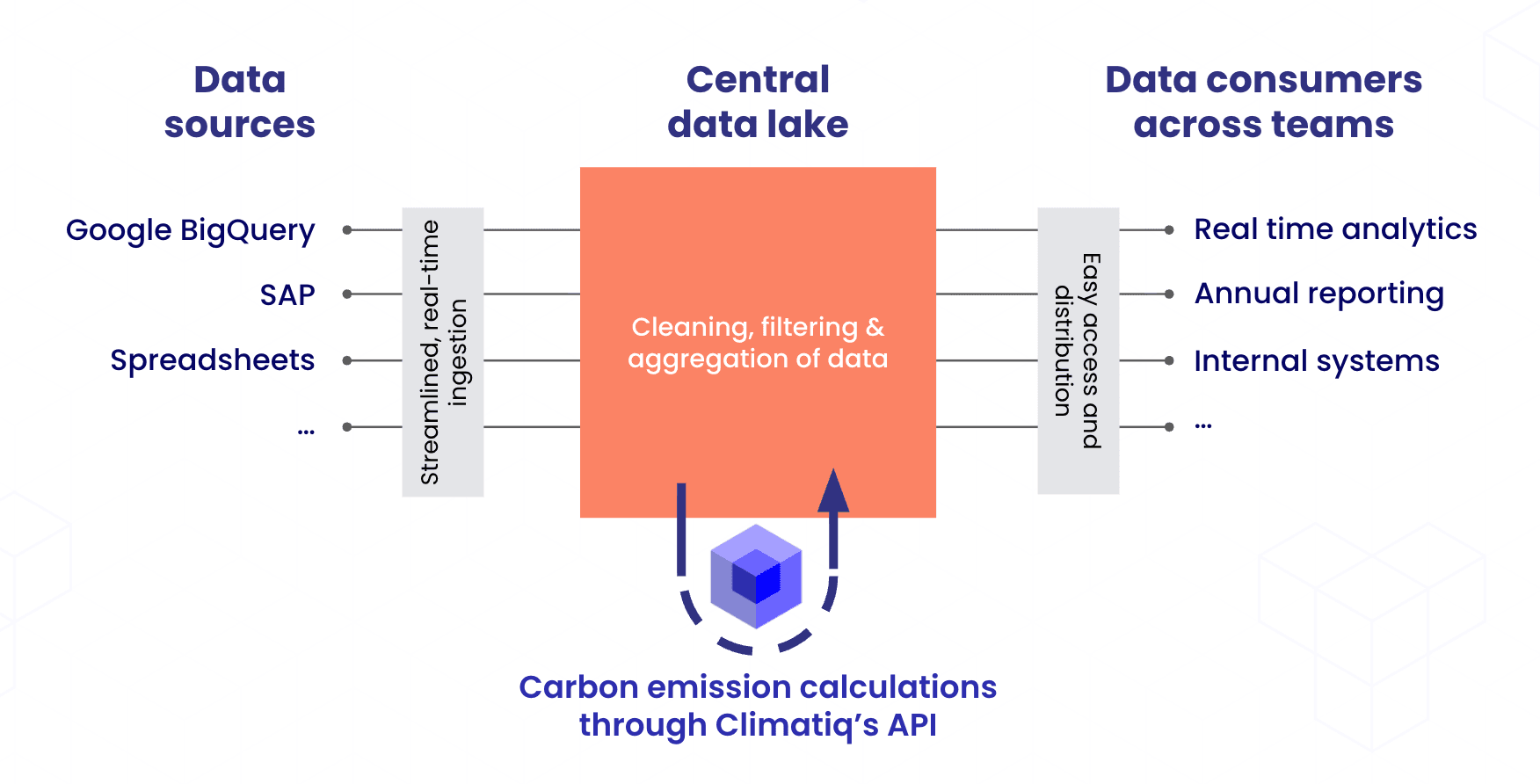
Climatiq acts as the calculation layer. Your data platform handles storage, scheduling, and delivery to the teams that consume the results.
Choosing the right endpoint
The Climatiq endpoint you use depends on what kind of activity data you have:
| Activity data | Endpoint |
|---|---|
| Spend or procurement transactions | Mapping Agent or Procurement |
| Energy consumption | Energy |
| Logistics and freight | Intermodal Freight |
| Activity data with known activity IDs | Basic Estimate |
See the API Overview for the full endpoint-to-use-case mapping including GHG scope coverage.
What to store from the response
Store the full Climatiq response for each record alongside your source data. Response structure varies by endpoint — freight returns per-leg breakdowns, some endpoints include source trails — and selectively storing a subset risks losing fields you need later for auditing or reproduction. Storing the whole response keeps your options open as reporting requirements evolve.
Keeping the full response means any calculation can be audited or reproduced exactly, even if the underlying emission factors are updated in a later data release. See the data versioning guide for how data versions work and when to update them.
Initial load vs. incremental updates
Initial load
When first connecting Climatiq to your data store, you will typically need to backfill emissions data for historical records. Pin a single data_version for the entire run so that results across your historical dataset are internally consistent and comparable. See fixed vs. dynamic data versions to choose the right version for your initial backfill.
Incremental updates
Once the initial backfill is complete, only process new or changed records on each subsequent run. Decide whether to use the same pinned version as the historical data (for consistency across your dataset) or the latest version (for accuracy with the most current emission factors). Align this decision with your reporting period boundaries - switching data versions mid-period will produce results that are not directly comparable. Review the data changelog before upgrading versions to understand what has changed.
Scheduling and triggers
Two patterns are common:
- Event-driven: trigger the pipeline when new records arrive in your data store. Suitable for near-real-time emissions tracking.
- Scheduled: run on a recurring cadence (daily, weekly, or monthly), processing all records added since the last run. Simpler to implement and sufficient for most reporting workflows.
If you want your calculations to reflect the latest emission factors, align scheduled runs with Climatiq’s monthly data releases. See the data versioning guide for guidance on managing data version updates in a pipeline context.
Performance at scale
For large datasets, use batch endpoints where available (Basic Estimate, Energy, Procurement) to process up to 100 records per request. For endpoints without a batch variant, keep concurrent requests at or below 10 per API key to avoid queue build-up.
See High-volume API usage for detailed guidance on concurrency, batching, and testing with a data subset before running a full dataset.
Using the results
Once emissions data is stored in your data lake, it becomes a shared asset across your organization. Reporting teams can query it directly to build GHG Protocol-compliant inventory reports without waiting for manual exports. Product teams can surface per-product or per-customer footprints from data already in the warehouse. Sustainability teams can track Scope 1, 2, and 3 progress against targets continuously rather than at reporting cycle end.
Because the full response includes the exact emission factor applied (source, year, and unique ID), stored records support year-over-year comparisons and full audit trails: you can reproduce any calculation exactly, even if emission factors are updated in a later data release.
Supporting resources
Overview of all Climatiq endpoints and which activity types and GHG scopes they cover.
Guidance on concurrency limits, batch endpoints, and testing before running large datasets.
How fixed and dynamic data versions work, and when to update them.
Full reference for batch endpoints, including supported endpoints and limits.