


Sustainability funding is shrinking. Yet professionals are still expected to deliver on tough reporting and decarbonization goals with a small team and restrictive budgets. Meanwhile executives are pushing them to implement AI wherever possible, but forgetting that in the sustainability world, one hallucinated number could land you in an audit or reputational nightmare.
Enter MCP servers: the connectors between your company data and verified carbon calculations, hidden right inside the AI tools you already know how to use. MCP servers can simultaneously remedy overstretched resources, inaccessible data, and clunky manual workflows. At the same time, you keep the context and rules you already use in your LLM, bringing credible calculations into your existing workflows without the need for another sustainability tool.
MCP (Model Context Protocol) lets an LLM, like ChatGPT, Claude, Gemini, or CoPilot, connect to outside tools and data. This doesn’t just work with the big names—MCP servers can also connect to custom company Al tools as well. Essentially, an MCP server is a connector that exposes a set of actions (for example, "calculate freight emissions") that the AI can call when it needs them. Think of the MCP server as a restaurant menu for an LLM to understand what tasks it can pick from.
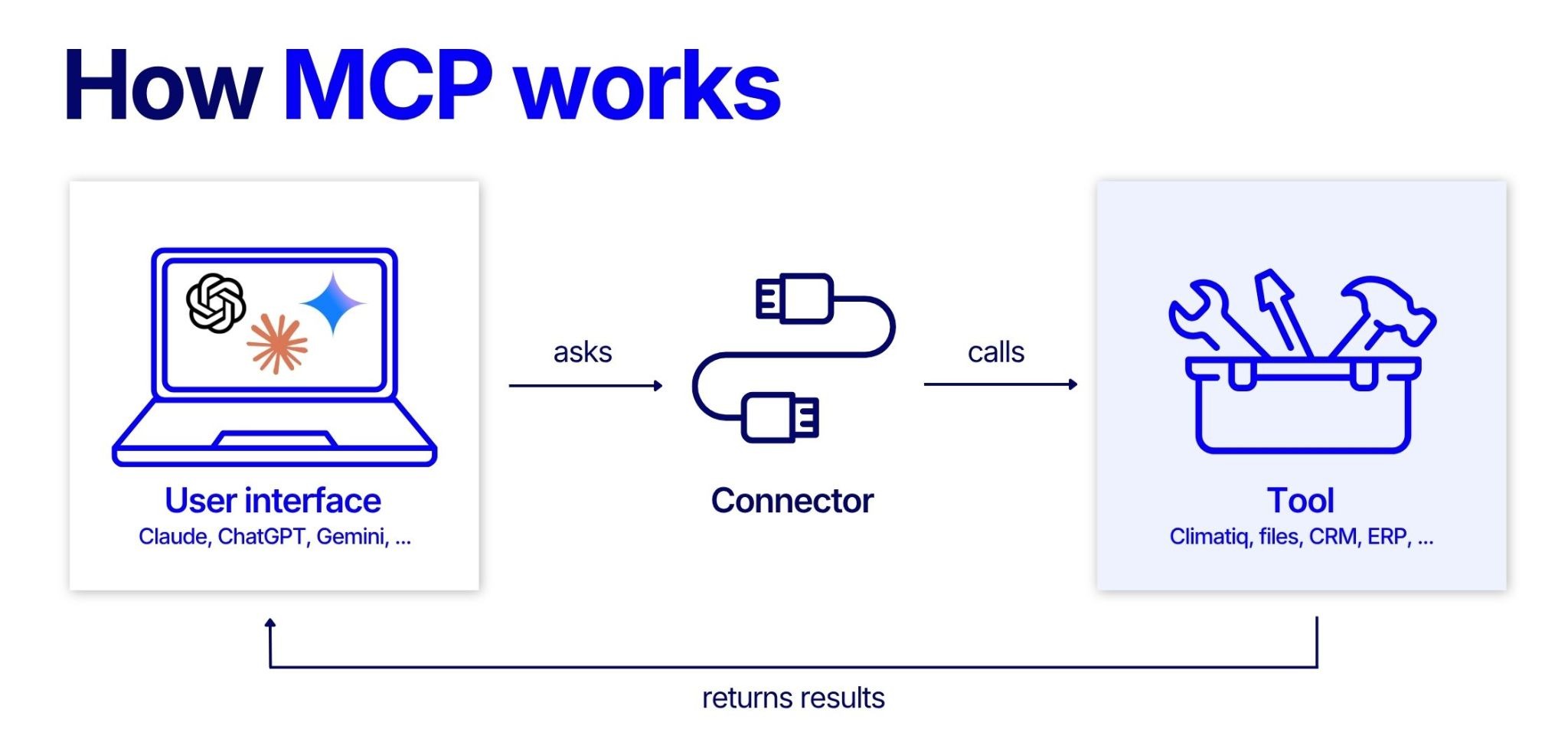
In carbon accounting, the key idea is that the AI handles the chat interface, while specialist tools do the calculations. That means the numbers come from a verified and deterministic methodology; you’re not relying on an AI that uses probabilistic reasoning to carry out complex calculation tasks. It’s just bridging the gap between the internal systems and external tools. Methodologically, it’s exactly the same as making a calculation within your carbon accounting platform, but in your familiar chatbot interface instead. At the same time, the LLM has access to all its outside knowledge to contextualize requests and tasks where needed.
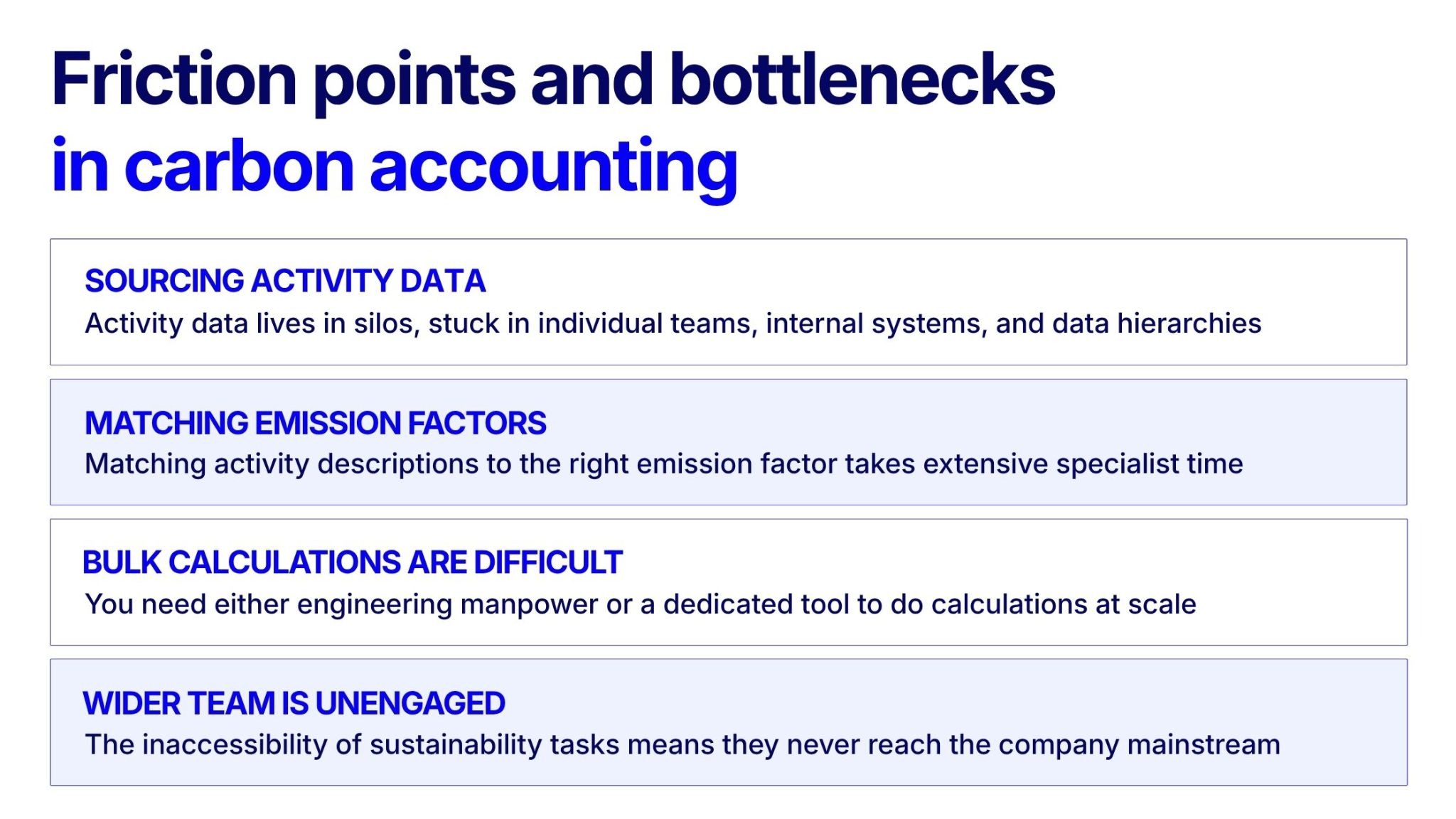
An MCP server can essentially work as a carbon calculator without building internally or onboarding an external tool. When you connect software and apps to your LLM, the MCP server can search your connected records to use as the basis for calculations—or you can upload input data directly, if you prefer. The AI can then process that information and send the relevant parts to a calculator (like Climatiq's API) to calculate emissions and compile results directly within the chat interface. All you have to do is send a message. This accelerates a range of sustainability tasks:
With just a product name and basic details, the Climatiq MCP server can build a list of possible components, find matching emission factors, and factor in freight calculations based on likely material sourcing locations to create a high-level PCF estimate. For a more precise output, you could upload a component list or bill of materials (BoM).
An example: a sustainability manager with 300 SKUs receives a customer request asking for PCFs for the items they procure. Previously this would take weeks or months of back-and-forth, by which time the request window has closed. It’s now a conversation of a few steps, with results they can review immediately.
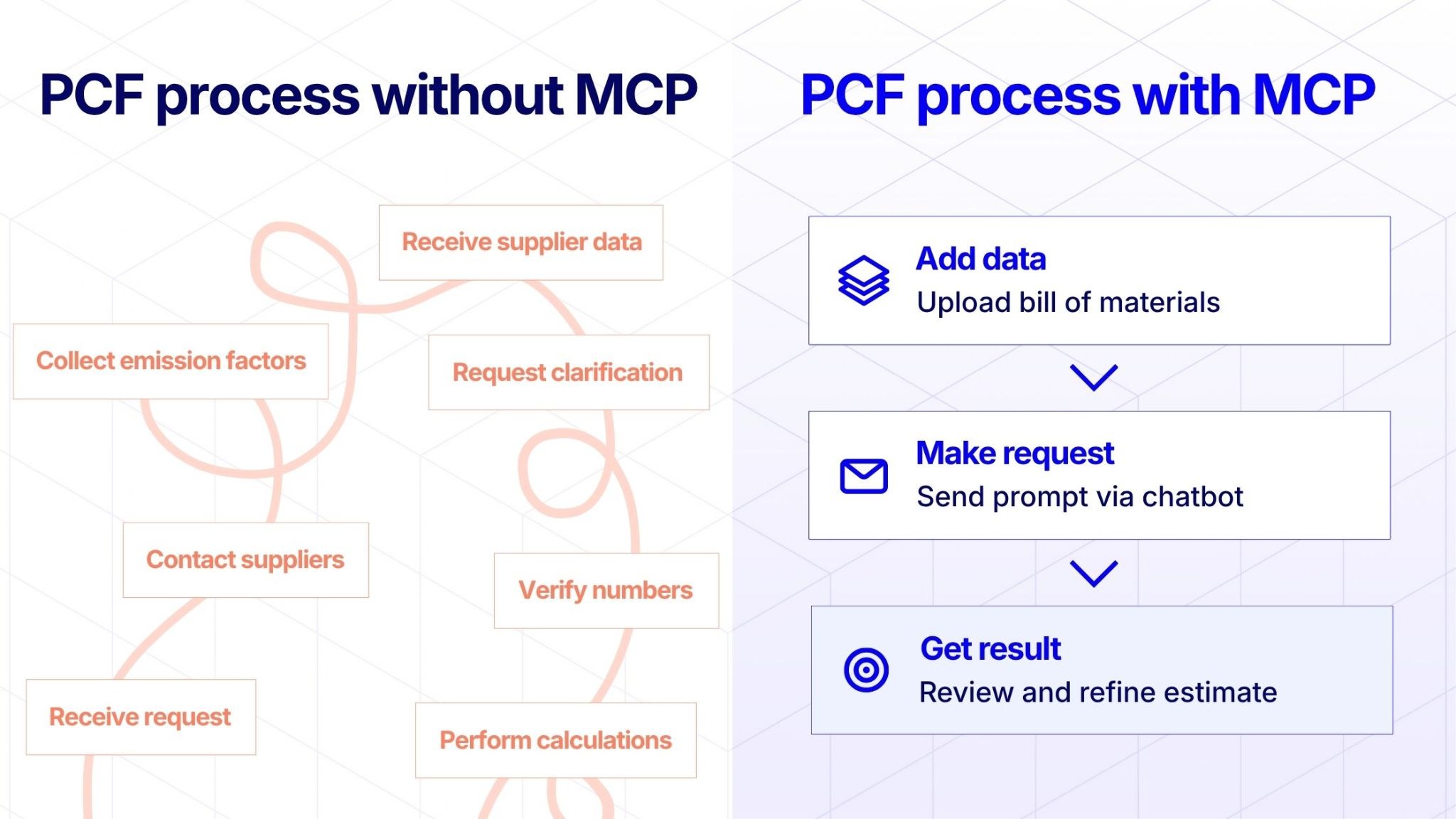
Screening-level PCFs are useful for scenario modeling to see the impact of your component and sourcing decisions on final emissions. They give you the ability to answer questions like, "What if we swap to X supplier?" or "We need to change to air freight—how will this impact the PCF?" Rather than making presumptive changes and hoping for the best, you can make informed decisions backed by data that actually move the needle.
Similarly, the Climatiq MCP server can use expense reports, invoices, or shipping records as the basis for passenger or freight transport calculations. For example, you could tell your LLM to “find any flight confirmations and Uber receipts in my email from the last month and measure the carbon footprint.” For freight shipments, this is a great opportunity for scenario modeling between different transport methods and sourcing locations.
Every company has a record of the energy they’ve used. The Climatiq MCP server makes it easy to unify all records across various office and manufacturing locations to quickly calculate scope 2 emissions, using bills or usage reports to surface an estimate in minutes.
Using tools like Claude Cowork, recurring tasks (e.g. monthly reporting) can run on a schedule without you having to even resend a prompt. Just set up the automation once via your chatbot with the right permissions and connectors, and you can entirely automate any repeated calculation tasks.
Link your LLM with other channels, for example Slack, and you can allow messages to trigger calculations, for example “turn this bill of materials into a screening PCF.” Suddenly carbon calculations become accessible for all team members. If you need to refine further, Climatiq automatically saves any PCFs created via MCP in PCF Studio to give you the flexibility to edit post-creation.
Letting AI do some of the work for you is great, but of course, there are still some things to be vigilant about when using MCP servers:
Many companies are reluctant to invest further in sustainability because of the high technical barrier to implement solutions. MCP servers are changing that: companies now have access to thorough emissions calculation capabilities without having to hire a whole specialist team or pay large sums of money for consultants, keeping costs low but quality high.
If you’re interested to try Climatiq’s MCP server and get access to best-in-class emissions calculations across product carbon footprints, energy, freight, and fast emission factor matches, contact our sales team to get access here.


.svg)


